Tag: challenge

DVC Day 16: Over Halfway

(This Post is part of my 30 day Data Visualization Challenge – you can follow along using the ‘challenge’ tag!)

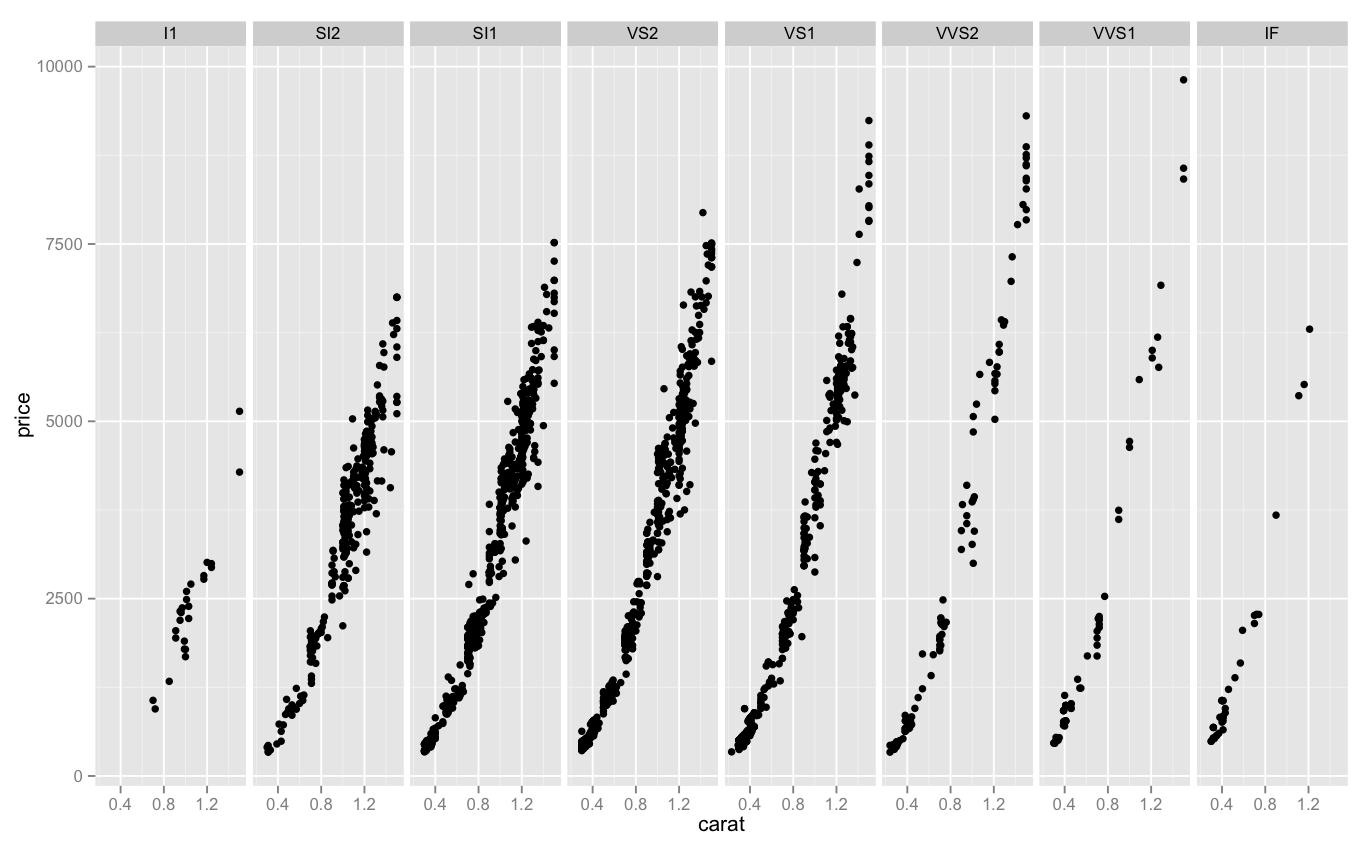
I am seriously spending a lot of time thinking about diamonds, you guys. One thing that I’ve asked myself is about value – or rather, price. Are there reliable ways to tell if a particular diamond will be more expensive? Are there certain clarities or colors with more outliers or deviations in general? Looking at you, J. Here’s one way to answer that question, by looking into price per carat mapped against carat weight, split up between clarities:

Screen Shot 2015-04-28 at 5.02.04 PM

Thoughts:
– We can see that even though the leftmost diamonds tend to be the largest, the price per carat paid per carat for them stays roughly equal as they increase in size.
– We can also see that as we progress to the right, there are fewer diamonds per set (probably, the dot density is a problem here), but the cost per carat climbs skyward, peaking at almost four times per carat compared to the leftmost clarity.
– This doesn’t do a great job of representing deviation from the norm, though. There is probably a better way to represent that visually.

Code:

> library(ggplot2)
> qplot(carat, price/carat, data=diamonds, alpha=I(.25)) + facet_grid(. ~ clarity) 
DVC Day 15: Request #3!

(This Post is part of my 30 day Data Visualization Challenge – you can follow along using the ‘challenge’ tag!)

In chatting a bit with another friend and colleague, Martin, he suggested that I look into two things – applying the diamonds data set to a spider chart, to more clearly illustrate exactly how differences look across sets, and to look into log-log plots.

It turned out, for a few reasons, that spider charts are a bit out of my pay grade (for now), but log-log plots are actually very interesting, and can totally show us something kind of interesting.

If, like me, you haven’t thought about logarithms in a dog’s age, here’s an article on Forbes that can get you started down the rabbit hole. The oversimplified and probably incorrect TL:DR is this – a standard hockey-stick up-and-right graph can be very useful to show change that is occurring, but sometimes a log-log plot can more clearly illustrate _the rate of change of that change._

That is, a company may be growing, but is the rate of growth accelerating?

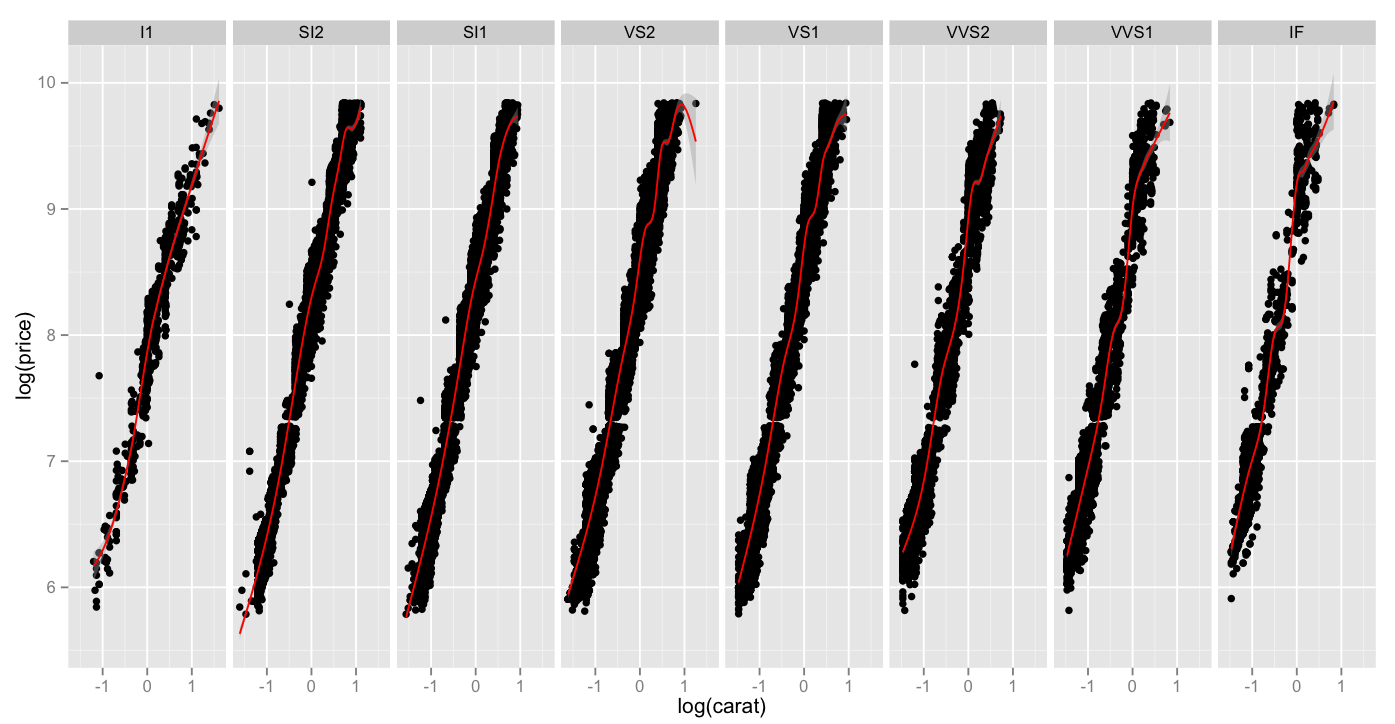
Here is a chart of log(carat) vs. log(price), which as you recall, when compared in a non-log format, had a pretty classic hockey-stick shape. When we compare the same values in a log-lot plot, here split up across clarities and a red smoothing geom applied, we can see that while all clarities move up-and-right as the carat weight increases, high clarities do so _at a faster rate_.

Screen Shot 2015-04-27 at 8.42.49 PM

Thoughts:
– I got ahead of myself and sort of dumped all my thoughts above the graph today. Sorry!

Code:

> library(ggplot2)
> log.facet <- ggplot(diamonds, aes(log(carat),log(price))) + geom_point()
> log.facet + facet_grid(. ~ clarity) + geom_smooth(color="red")

DVC Day 14: Request #2

(This Post is part of my 30 day Data Visualization Challenge – you can follow along using the ‘challenge’ tag!)

Responding to a comment (again from Ben!) on Day 11, I’ve used the more atomic plotting function of ggplot to break the data into another separate facet_grid – which definitely helps to illustrate (a little) the relationship between clarity and price on J colored diamonds:

Screen Shot 2015-04-25 at 8.30.09 PM

Thoughts:
– This may be less colorful, but it is a much more clear representation of the data at hand – we can see that as we progress from left to right, the apparent upward slope of price becomes steeper.
– It’s interesting that there is a real density change in the 2000-5000 price as we move from left to right – that’s where the lion’s share of column 2, 3 and 4 are, but in 5, 6 and 7 they narrow out. Maybe this is a cultural thing, re: pricing expectations for certain clarities?

Code:

> library(ggplot2)
> jsmall <- subset(diamonds, color=="J" & carat <= 1.5)
> j.facet <- ggplot(jsmall, aes(carat, price)) + geom_point()
> j.facet + facet_grid(. ~ clarity)

DVC Day 13: Dropping the “Quick”

(This Post is part of my 30 day Data Visualization Challenge – you can follow along using the ‘challenge’ tag!)

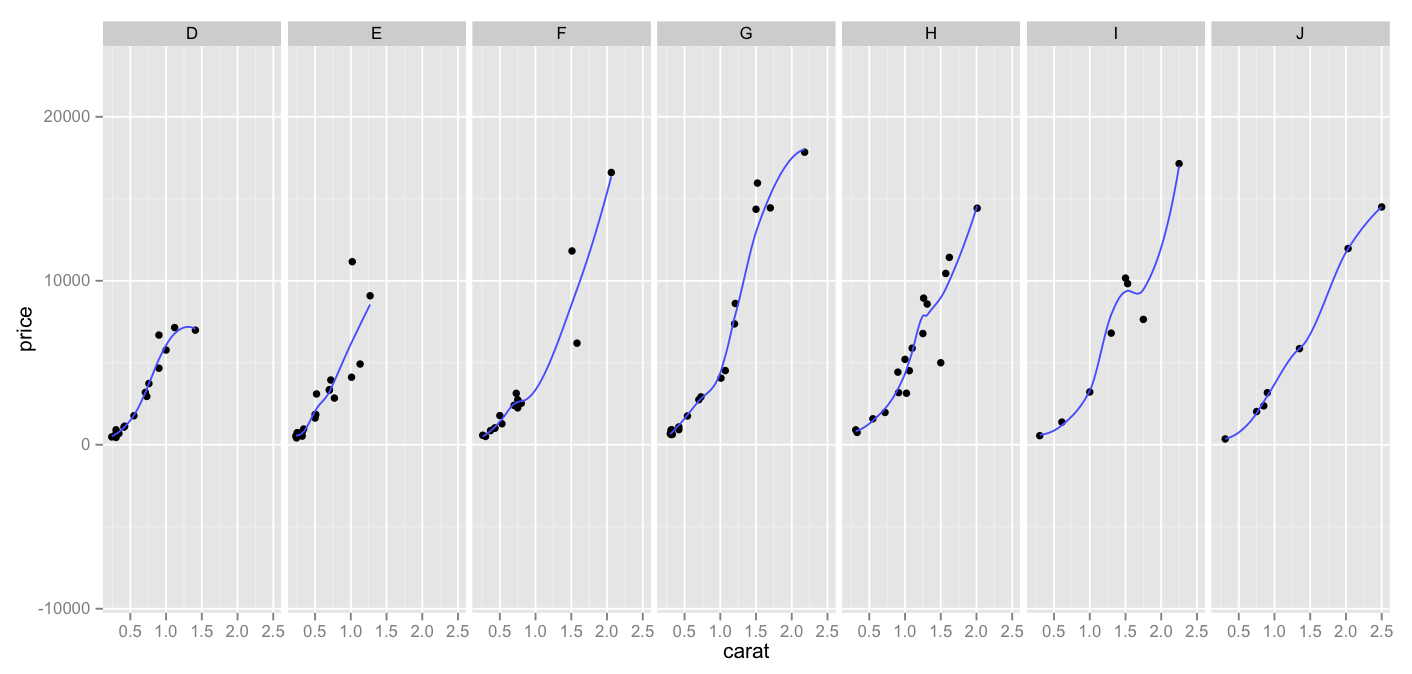
As I get more comfortable poking around in ggplot2, I’ve come to a place where I want to step back a bit – qplot is 100% awesome and is a great way to get started with this library, but I want to try my hand at putting together plots fully manually, if only to better understand the way that ggplot2 works more generally. So, I did! Here’s a plot where we’re trying to confirm that across diamond color, as carat size increases, price tends to increase as well. You recall, especially with J, this seemed to be in question:

Screen Shot 2015-04-25 at 10.13.07 AM

Thoughts:
– Again I pulled a sample from the (huge) diamonds dataset. It’s the same smaller sample that I used in earlier days.
– You’ll note that instead of using a single qplot, we put together a few lines of code.
– Here we have three things going on – points indicating carat v. price, a facet_grid indicating each color on its own facet (rather than representing them via different colors or symbols) and a smoother line, indicating general path of the data (as opposed to a more jagged point-to-point line)
– I prefer this to the all-dots-on-board approach that I was using before – while it was colorful, and interesting, I don’t think it illustrated the relationships as well as splitting them up into facets, like this.

Code:

library(ggplot2)
set.seed(1410)
dsmall <- diamonds[sample(nrow(diamonds),100),]
dvc <- ggplot(dsmall, aes(carat,price)) + geom_point()
dvc + facet_grid(. ~ color) + geom_smooth(fill=NA)

DVC Day 12

(This Post is part of my 30 day Data Visualization Challenge – you can follow along using the ‘challenge’ tag!)

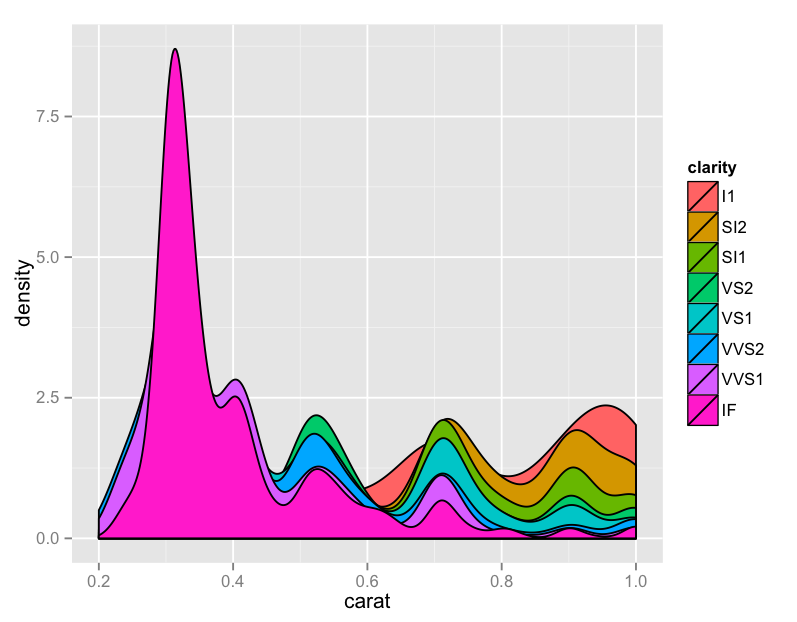
I, too, was disappointed in yesterday. I spent some time looking at the data, and figured maybe a different approach would yield more information – part of what made yesterday’s chart a bit unwieldy was the amount of information. I reduced the subset to only carat weight below one, and plotted a density graph of carat alone, with fill color defined with a cohort’s clarity:

Screen Shot 2015-04-21 at 8.47.58 PM

Thoughts:
– Now we’re cooking! Look at that – it looks like under half a carat, the “IF” clarity completely dominates the other categories. This was not at all evident from yesterday’s visualization.
– Again, using the Brewer Palette – these are really sharp, and have palette options for lots of different use cases. Is it weird that I’m excited about this?
– Remember, these are not all of the diamonds, but only those with the color “J”

Code:

library(ggplot2)
jsmaller = subset(diamonds, color="J", carat <= 1)
plot.jsmaller = qplot(carat,data=jsmaller,fill=clarity, binwidth=.01, geom="density")
plot.jsmaller + scale_color_brewer(palette="Set1")