Tag: challenge

DVC Day 11: Yes I Take Requests

(This Post is part of my 30 day Data Visualization Challenge – you can follow along using the ‘challenge’ tag!)

Back on Day 6, my buddy Ben asked:

There’s a lot more data down in the sub 1.0 carat range than above. What happens when you restrict the set to less than a carat?

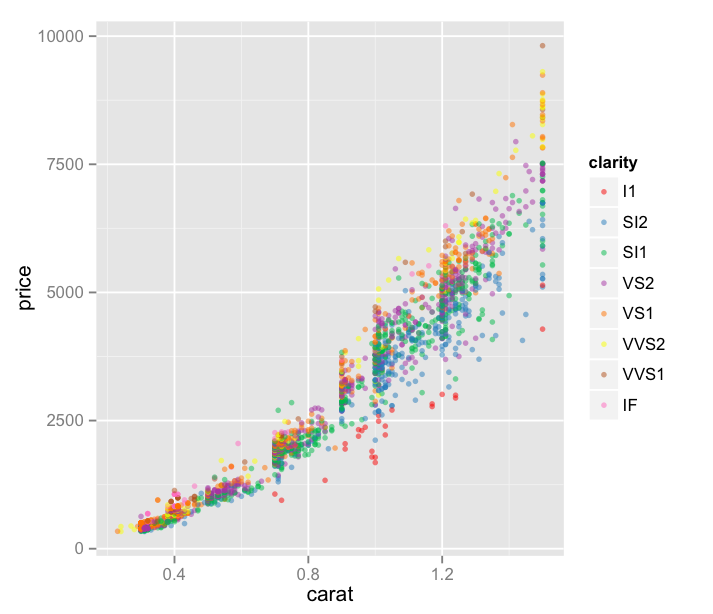
Let’s take a look! You’ll recall that on Day Six we were looking at only the diamonds of the J color – my favorite, I always root for the underdog – viewing carat v. price with each point’s color indicating its clarity.
Screen Shot 2015-04-21 at 8.28.47 PM

Thoughts:
– Also at Ben’s suggestion, I’ve started reading about Brewer Color Scales, which are really interesting, useful, and all around awesome.
– We’ve reduced our area to only “J” color diamonds below 1.5 carats – a bit more than requested but I was curious!
– I’ve also added an alpha value, which helps us to deal with the dot density a bit. It essentially sets the opacity of a single point, so areas of lower density can be more easily identified, since they’re a bit faded.
– This visualization is not great. It’s sort of hard to see what’s happening here. There must be a better way to display this in a way that can provide some insights.

Code:

library(ggplot2)
jsmall <- subset(diamonds, color=="J" & carat <= 1.5)
plot.j.small <- qplot(carat, price, data=jsmall, color=clarity, size=I(1.5), alpha=I(.5))
plot.j.small + scale_color_brewer(palette="Set1")
DVC Day 10: Stacks on Stacks

(This Post is part of my 30 day Data Visualization Challenge – you can follow along using the ‘challenge’ tag!)

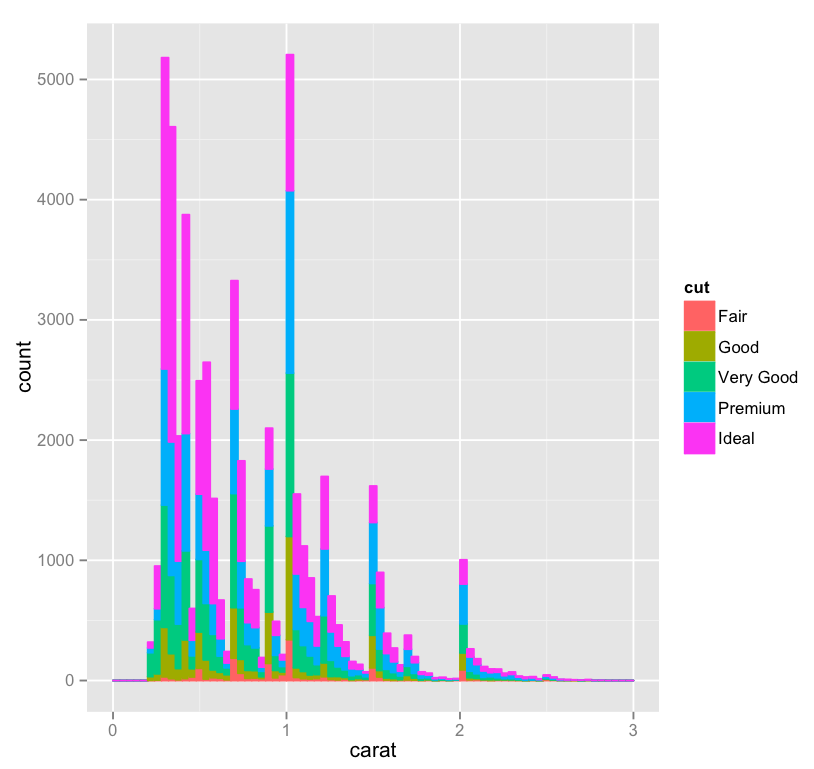
One third of the way through! I’ve played a bit with yesterday’s histogram and done two things – added ‘cut’ as a fill, and widened the bin a bit, just for looks:

Screen Shot 2015-04-20 at 8.29.07 PM

Thoughts:
Here’s the same visualization at the narrower bin width.
 It’s interesting, here we can see that although we have about as many .25 carat diamonds as we have 1 carat diamonds, the .25 carat cohort includes quite a lot more Ideal cut gems. I wonder if this is a natural consequence of being a bit smaller, or if “lesser” cuts of smaller diamonds are discarded or used in other ways more frequently, which would throw off the ratio, since the 1 carat bar doesn’t look so far off of the other spikes.

Code:

library(ggplot2)
qplot(carat, data=diamonds, geom="bar", fill=cut, binwidth=.04, xlim=c(0,3))

DVC Day 9: Bin What?

(This Post is part of my 30 day Data Visualization Challenge – you can follow along using the ‘challenge’ tag!)

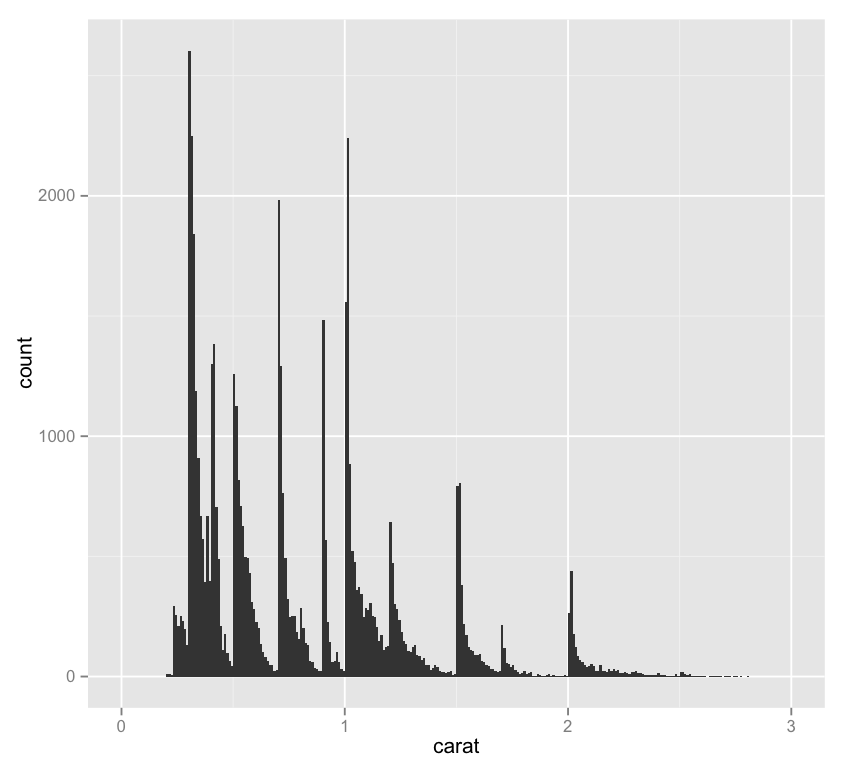
Testing our earlier hypothesis that the vertical striations in our data were due to a preference for “whole” carat numbers – or at least more readable numbers, we can look at a single-variable histogram:

Screen Shot 2015-04-20 at 8.19.26 PM

Thoughts:
– One interesting thing about this chart is the importance of binwidth, which sets the resolution of the data in a histogram – for instance, here’s this same chart with a binwidth of .15 rather than .01. It loses a lot of the utility of the chart above!
– It might be interesting to display a second variable here in a way other than on the y-axis – as a color maybe.

Code:

library(ggplot2)
qplot(carat, data=diamonds, geom="histogram", binwidth=.01, xlim=c(0,3))

DVC Day 8: Messin’ with (More) Geoms

(This Post is part of my 30 day Data Visualization Challenge – you can follow along using the ‘challenge’ tag!)

In playing a bit more with the qplot geoms call, I spent some time with the “jitters” geom, which has nothing to do with coffee, as it turns out. Jittering is a neat method to fight against the same sort of dot density that we saw earlier in the challenge – it creates a larger space for points to be plotted, which makes a visualization more readable. Here’s this same visualization without the jittering.

tXFnUXRYOl-3000x3000

Thoughts:
– The more I do this, the more I realize I don’t know about diamonds.
– The more I do this, the more I realize I don’t yet understand about R and visualizing data. It’s exciting!
– There’s a consistent pattern to the clarity layers that we see, repeating what looks like 3 times, yellow, green, blue, pink, and then again, and then a third time, with pink sort of stretching skyward. What’s that about?
– The “J” color continues to be interesting to me – why is it so jumbled up when the others seem to be at least somewhat orderly? It also reaffirms our previous findings, where we noticed that “J” diamonds seemed to be outliers (in a bad way) on the price vs. carat chart.

Code:


library(ggplot2)
qplot(color, price/carat, color=clarity, data=diamonds, geom="jitter")

DVC Day 7: Messin’ with Geoms

(This Post is part of my 30 day Data Visualization Challenge – you can follow along using the ‘challenge’ tag!)

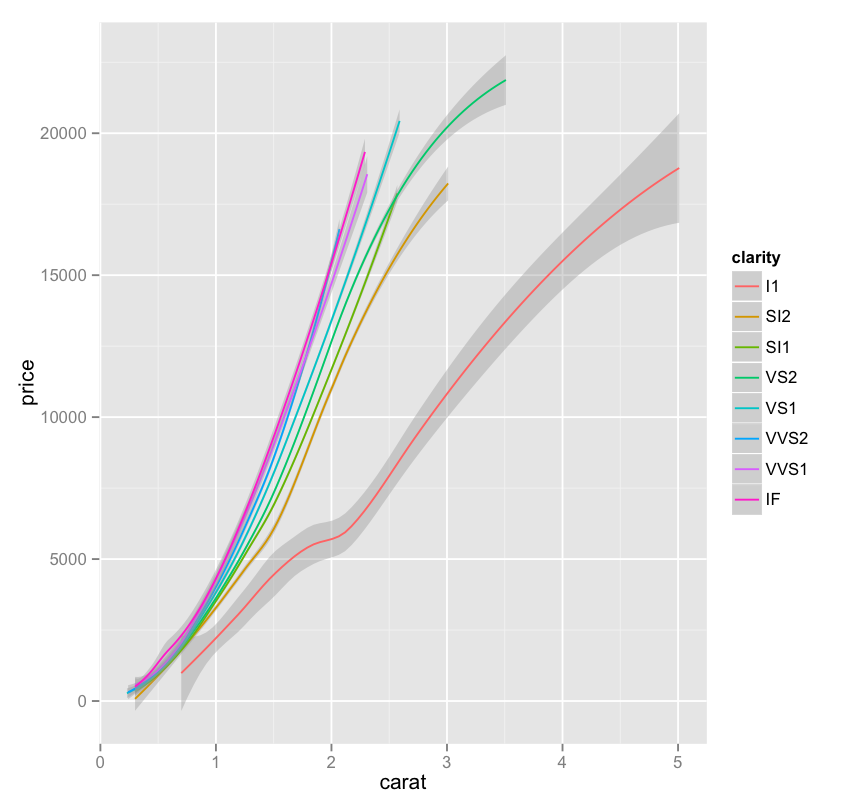
In noodling around with the different options of the qplot function (and there are plenty), I found myself going back and forth on the geom option – here’s one of the possible inputs, smooth, which takes us from yesterday’s graph to one of just very smooth lines, with a shading indicating the standard deviation of that particular collection of data:


nZnlIFK9Qn-3000x3000

Thoughts:
– This is a really interesting example of another case where we trade some visual precision for more visual utility – for example,that same graph using arguably more a more precise plotting of lines looks like a total, and useless, mess.
 The green line is particularly interesting, since it appears to plateau at a certain point – about the same place where it is the only remaining clarity.

Code:


library(ggplot2)
only.j <- subset(diamonds, color=="J")
j <- qplot(carat, price, data=only.j, color=clarity, geom=c("smooth"))
j