Author: Simon

DVC Day 22: Bear or Dance?

(This Post is part of my 30 day Data Visualization Challenge – you can follow along using the ‘challenge’ tag!)

Another built-in bit of ggplot2 is the ability to take any bar chart (geom_bar() or geom=”bar”) and convert it into something like this, called a coxcomb chart. It’s sort of like a pie chart, but with more information density:

Screen Shot 2015-05-04 at 8.45.21 PM

Thoughts:
– I’m not totally sure when a chart like this is more appropriate (or more readable, or more understandable) than a simple bar graph of the same data. It’s definitely cool looking, but I don’t know if it conveys information in a meaningfully better way.
– When total data points collected vary so much (look at VS2 vs IF for example), it’s hard to tell how the smaller groups really compare to the larger ones. This is a problem with bar charts too, though.

Code:

> library(ggplot2)
> p <- ggplot(diamonds, aes(clarity, fill=cut)) + geom_bar()
> p
> p + coord_polar()
DVC Day 21: Spice of Life, etc etc

(This Post is part of my 30 day Data Visualization Challenge – you can follow along using the ‘challenge’ tag!)

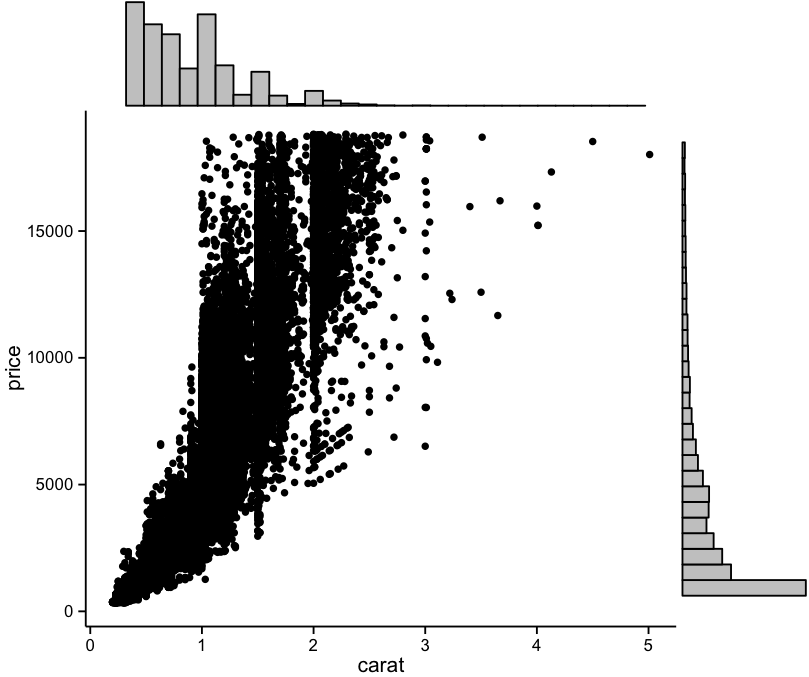
In exploring the R ecosystem, I find myself exposed to lots of different ways of doing things, along with a real diversity of opinion on how to best present data. I’m working on studying up on that but for now, I’m satisfied giving lots of different things a try. In noodling around on R Bloggers, I found Dean Attali and his ggplot2 add-on library, ggExtra, that lets us do stuff like this:

Screen Shot 2015-05-04 at 8.01.24 PM

Thoughts:
– It really is remarkable how powerful open source software is. When you’re steeped in it every day, it becomes almost second nature, the obvious way.
– I like the sidebar histograms; they present a novel reply to dot density problems. I can see them being useful in a great number of cases, especially with larger, more spread out scatter plots.

Code:

> library(ggplot2)
> library(ggExtra)
> p <- ggplot(diamonds, aes(carat,price)) + geom_point() + theme_classic()
> ggExtra::ggMarginal(p, type="histogram")

DVC Day 20: Hotter Heat Map

(This Post is part of my 30 day Data Visualization Challenge – you can follow along using the ‘challenge’ tag!)

After spending some more time thinking about heat maps, and reading the way that a few other R practitioners approach them (huge thanks to R-bloggers), I noodled around a bit with our earlier heat map to produce this, which I think is a bit more readable, and also provides more visually appetizing data bites:

Screen Shot 2015-05-03 at 8.27.09 AM

Thoughts:
– Using only one triangle of the correlation matrix means we don’t repeat data, and it makes it a bit easier to pick out what you’re seeing.
– It’s interesting to see that depth and table have nearly no impact on price, and are in fact negatively correlated with one another – making negative correlations more visually apparent is a good move, I think, as it was tough to tell “uncorrelated” from “negatively correlated” in the last iteration of the heat map.

Code:

> library(ggplot2)
> library(reshape2)
> dnum <- diamonds[c(1,5:10)]
> dnum <- sapply(dnum, as.numeric)
> dcor <- round(cor(dnum), 2)
> get_lower_tri <- function(cormat){
+ cormat[lower.tri(cormat)] <- NA
+ return(cormat)
+ }
> dcor <- get_upper_tri(dcor)
> melted_dcor <- melt(dcor)
> ggplot(data = melted_dcor, aes(Var2, Var1, fill=value)) + geom_tile(color="white") + scale_fill_gradient2(low="blue", high="orange", midpoint=0, limit=c(-1,1)) + theme_minimal()

DVC Day 19: The World’s Smallest Violin

(This Post is part of my 30 day Data Visualization Challenge – you can follow along using the ‘challenge’ tag!)

Another way we can approach the overplotting problem (especially now that we recognize how useful but not-sexy box plots are) are a ggplot2 plot type called violin plots – here’s the same data as with the box-and-whiskers, but in the shape of everyone’s second-favorite string instrument:

Screen Shot 2015-05-01 at 4.20.37 PM

Thoughts:
– Much sexier than box-and-whisker!
– Despite being a bit nicer to look at, things like the median, outliers, etc, are not quite as easy to distinguish.
– The space to the right of each of the graphs is distracting – in the future I would probably do a harder line around each individual clarity box.

Code:

> library(ggplot2)
> fiddle <- ggplot(diamonds, aes(carat, price/carat)) + geom_violin(alpha=.65, fill="blue") + facet_grid(. ~ clarity)
> fiddle

DVC Day 18: Heat Maps for Everybody!

(This Post is part of my 30 day Data Visualization Challenge – you can follow along using the ‘challenge’ tag!)

It turns out heat map style representations of correlations are pretty easy in ggplot2 – here’s one that includes all of our roughly numerical values in the diamonds data set:

Screen Shot 2015-04-30 at 8.40.12 PM

Thoughts:
– This is so far the most pre-processing we’ve had to do during the challenge. First, grab a sample, then grab only the numbers-based columns, then convert them all into R-recognized numeric values, then create the correlation, then melt the table into a more heatmap friendly format, and then plot that data. Phew.
– The visualization itself is sort of neat, but it doesn’t really bring us any new insights. It’s kind of interesting to see that table and depth are not all that correlated. It makes some sense after reading this, but I’m not totally sure I understand, to be honest.
– I can see how a heatmap style correlation matrix like this would be very handy for more numerically-oriented data sets. I wonder if there’s any way to include non-numerical values in this type of visualization.

Code:

>library(ggplot2)
> library(reshape2)
> set.seed(1117)
> dsmall <- diamonds[sample(nrow(diamonds), 1000), ]
> dnum <- dsmall[c("carat", "clarity", "depth", "table", "price")]
> dnum <- sapply( dnum, as.numeric )
> dcor <- round(cor(dnum), 2)
> melted_dcor <- melt(dcor)
> ggplot(data=melted_dcor, aes(x=Var1, y=Var2, fill=value)) + geom_tile(color="white")